


MiChildSupport
4.110.00 Reviews
App Specs
- Version
- 1.4
- Updated On
- License
- Free
- Downloads
- 10,000+
- Developer
- State of Michigan
- Categories
- Parenting
- Platform
- Android
Screenshots
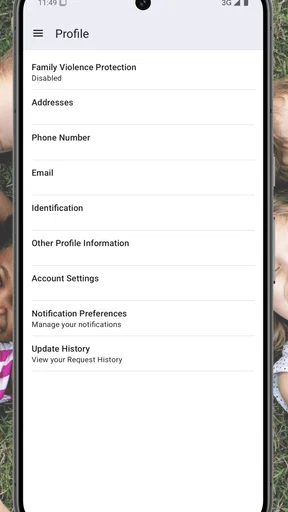
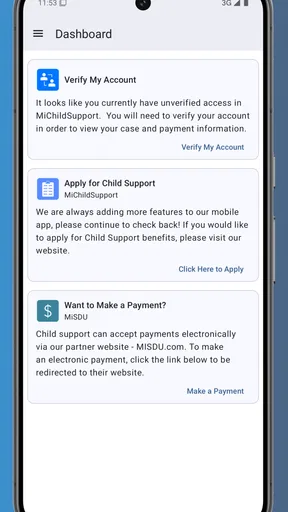
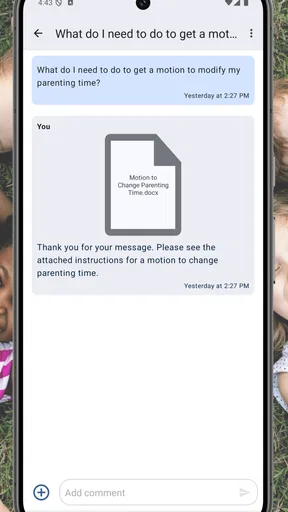
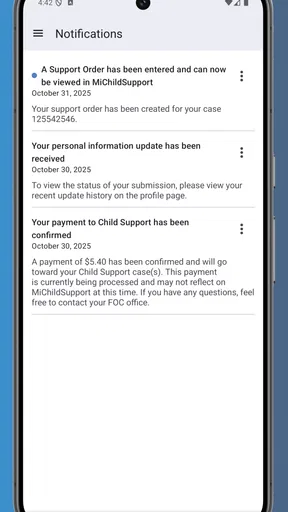
 Analysis by AppCompare
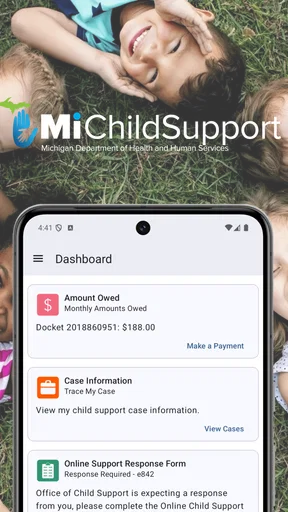
When a child support question is already stressful, the hardest part is often not understanding the issue itself but knowing where to begin. MiChildSupport is designed as a direct connection to a child support case, and I found its value comes from putting that case closer at hand instead of making parents start from a general web search every time they need to check something. It is a free parenting app from the State of Michigan, intended for people who already have a Michigan child support matter to manage.
I would not describe it as a broad family organizer or a parenting advice tool. Its usefulness is narrower and more practical: it is meant to support the administrative side of an existing child support case. That distinction matters. If you are looking for custody calendars, shared shopping lists, messaging between co-parents, or general legal education, this is probably not the app I would choose. If your main concern is staying connected to your Michigan case, however, it has a much clearer purpose.
Following a child support task from question to outcome
I’d use this section to follow a child support question through the decisions that come after checking the case, not just the moment the app opens. The key practical habit is to separate what the record shows from what still needs action, then carry any unresolved point into the right conversation or official channel. That makes the next step clearer without assuming that viewing information completes the task.
Starting with the right expectation
The first thing I would tell a new user is to approach MiChildSupport as a case-access tool rather than a replacement for every child support service. The store summary presents it as a connection to your child support case, and that is the right mental model. You open it because you have a case-related question or task, not because you want a general parenting dashboard.
This helps avoid a common source of frustration with government apps: expecting one screen to explain the entire process. Child support involves records, decisions, payments, notices, and communication between several parties. An app can make access more convenient, but it cannot remove the underlying responsibility to read information carefully or follow the proper process.
The app is rated for Everyone, which makes sense for a public service aimed at parents and families. It is available at no cost, and the current release is version 1.4. It runs on Android devices using version 5.0 or later, so people with older but still usable phones may not need to replace their device simply to try it.
Opening the app when the issue is urgent
A realistic use case would be a parent who receives a case-related notice while away from a computer. Instead of waiting until the evening to locate the Michigan child support website, the parent can try the mobile app first and look for the relevant case connection or account information. That is a small change in routine, but it can be important when a question comes up between work, school pickup, and other family responsibilities.
Worth Reading Before You Choose

EA SPORTS FC Mobile 26 Is a Bigger Football Game, but It Takes Time

Flipboard Shows What News Apps Must Do Beyond the Feed

Switching to Android Auto Means Rethinking Your Driving Routine

Google Calendar Makes a Crowded Week Easier to Manage

Ludo King Makes the Most of the Minutes Between Plans

Baby Panda World Brings Quick Play to Modern Phones, but Its Game Library Feels Busy
My practical advice is to decide what you need before opening it. Are you checking the status of a case? Looking for information connected with a payment question? Trying to understand what action should happen next? Having that question ready makes the session more focused and reduces the temptation to tap through screens without knowing what outcome you want.
I would also keep any official correspondence nearby. When dealing with child support, names, case references, dates, and amounts can be easy to confuse, especially if more than one child or case is involved. The app may make access easier, but it does not make careful comparison unnecessary. Treat the phone as a convenient window into your case, not as a substitute for keeping important records.
Moving from access to a usable answer
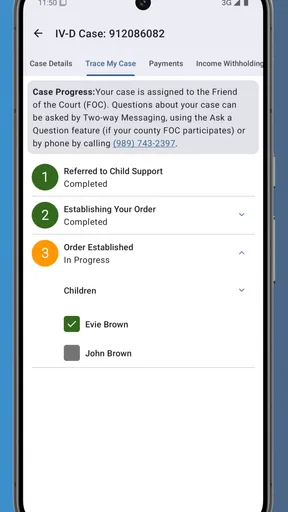
The strongest workflow is simple: open the app, connect to the relevant case information, identify the item that needs attention, and then decide whether the answer is enough or whether another step is required. That last part is easy to overlook. Seeing information is not always the same as completing an action.
For example, a parent may be checking whether a recent development is reflected in the case. The useful outcome is not merely finding a screen; it is confirming what the information means for the next conversation, payment check, or administrative step. I recommend reading the surrounding details rather than relying on a single prominent status or amount. Child support records can be sensitive to timing, and a quick glance may produce the wrong conclusion.
This is one of the app’s less obvious strengths: it encourages a more direct route to case information than searching through unrelated pages. The trade-off is that the user still has to interpret the information responsibly. MiChildSupport can reduce the effort of finding the case, but it cannot decide what a particular situation means for your family.
Handling the handoffs between people and systems
Child support rarely involves only one person. A parent may need information for a conversation with the other parent, a response to a notice, a discussion with an agency representative, or personal recordkeeping. That is where handoffs become important. The app can be the point where you retrieve information, but the next step may happen outside the app.
I found it helpful to separate three questions: what does the case record show, what do I need to do, and who needs to receive or confirm the next step? Keeping those questions separate prevents a common mistake—assuming that viewing information automatically sends a message, updates a record, or resolves a disagreement.
For a co-parenting situation, I would use the app to check the relevant information first, then communicate using the channel that the case or situation requires. I would avoid treating a screenshot or an informal message as a formal submission unless the process specifically says that it is acceptable. This is an important trade-off compared with a private co-parenting app: MiChildSupport is focused on the case connection, while a family communication tool may be better for everyday coordination.
The same principle applies when speaking with an agency representative. Before contacting someone, write down the exact point that remains unclear and the information you already reviewed. That makes the handoff more efficient and lowers the chance of describing the issue inaccurately. The app is most useful when it helps you arrive at that conversation prepared.
Turning a case check into an everyday routine
I would not recommend repeatedly opening the app without a reason. A better habit is to use it at specific moments: after receiving official correspondence, before discussing a case issue with the other parent, or when preparing for a call about an unresolved question. This turns the app into a practical checkpoint rather than another source of notifications and worry.
One non-obvious benefit of that routine is consistency. If you always check the case information before making a related phone call, you are less likely to rely on memory. That matters when a parent is balancing several obligations and remembers the general situation but not the exact detail that needs attention.
Another useful habit is to note the date of your own review in a personal record. I am not suggesting that the app itself creates a legal journal; rather, keeping your own simple timeline can help you remember when you checked information and what question remained afterward. That is especially useful when a matter develops over several conversations.
What the app does well compared with usual alternatives
The usual alternative is a browser, a phone call, or paper correspondence. A browser may provide broader information, but it can take more effort to locate the correct case pathway on a small screen. A phone call may be necessary for a complicated issue, yet it is not always the fastest way to answer a straightforward case-access question. Paper records remain important, but they are not convenient when you are away from home.
MiChildSupport fits between those options. It offers a mobile route for checking the connection to a Michigan child support case, while official correspondence and direct assistance remain important for matters that need explanation or formal handling. In my view, that is the app’s most realistic role: it can shorten the path to information, but it should work alongside—not replace—the other channels.
This also explains why the app may not satisfy everyone. Someone who wants a complete co-parenting workspace would probably be better served by a dedicated family organizer. Someone facing a legal dispute or an unusual case question may need direct professional or agency guidance. Someone without a Michigan child support case has little reason to install it at all.
Where the workflow can break
The first point of friction is expectation. If you open the app hoping for broad explanations of child support law, you may find the case-focused approach too limited. The app’s purpose is practical access, not a full educational course. I would use a separate trusted source for general background and reserve MiChildSupport for information tied to the case itself.
The second issue is interpretation. A record can show useful information without answering the personal question behind it. For instance, a parent may see that something is recorded but still need to know whether an action is complete, pending, or requires follow-up. That is where reading carefully and contacting the appropriate channel becomes necessary.
A third weakness is the handoff problem. Mobile access is convenient, but many real outcomes depend on what happens afterward. If the next step requires documentation, a formal request, a conversation, or confirmation from another party, the app alone may not finish the job. I would keep the relevant notice and write down the follow-up task immediately instead of assuming the workflow is complete when the screen changes.
There is also a human limitation: sensitive financial and family information is easy to review hurriedly on a phone. I would avoid checking it while distracted, especially during a tense conversation. Find a quiet moment, verify that you are looking at the correct case information, and record the question that remains. That small discipline makes the app more useful than casual tapping.
Who should install it and who should skip it
I think MiChildSupport is a sensible choice for a Michigan parent who wants a more convenient mobile connection to an existing child support case. It is also useful for someone who regularly moves between home, work, and school or childcare responsibilities and does not want every case check to depend on reaching a computer.
I would be more cautious about recommending it to a person who expects instant resolution of a disputed payment, a detailed legal explanation, or a complete communication system for co-parents. Those needs may require another channel, and installing this app will not remove that need. It is also not a substitute for keeping official documents, following instructions in notices, or asking for help when the case information is unclear.
The app’s early adoption is modest but meaningful: it has passed ten thousand installs, with an average rating of 4.1 from roughly one hundred fifty ratings. I read that as a generally positive sign rather than a guarantee. The rating suggests that many users find the basic purpose worthwhile, while the relatively focused audience means every parent’s experience may depend heavily on whether the app matches their particular case task.
My final assessment of the complete journey
From starting condition to outcome, MiChildSupport works best when the journey is clearly defined. You begin with a Michigan child support question, use the app to reach the case information, compare what you see with your own records, decide what action is actually needed, and then complete any handoff through the proper channel. That workflow is more valuable than simply having another app on the phone.
I like the focused approach. A public-service app does not need to imitate a social network or a general parenting planner to be useful. Its free access, Everyone age rating, and support for older Android devices make it approachable for the people it is meant to serve. The State of Michigan is also clearly identified as the developer, which gives the app a direct public-service identity rather than presenting it as an unofficial third-party organizer.
At the same time, I would keep my expectations grounded. The app can make case access more convenient, but it cannot interpret every situation, settle disagreements, or guarantee that a case-related task is complete simply because information is visible. The best result comes from using MiChildSupport as the first step in a careful workflow, not the entire workflow.
For the right user, that is enough to make it worthwhile. If you have a Michigan child support case and want a practical mobile connection to it, I would recommend trying MiChildSupport. If your needs are broader than case access, I would pair it with the appropriate official resources and a separate co-parenting tool rather than expecting one app to handle everything.
Pros
- Provides quick access to child support case information.
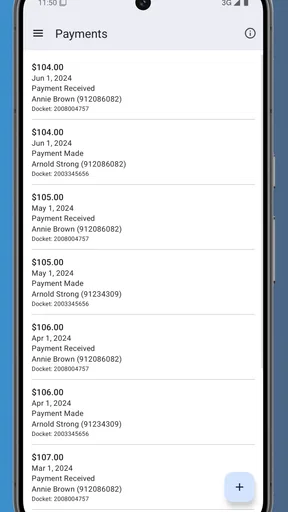
- Helps users track payment activity and account updates.
- Mobile access is convenient when managing cases on the go.
- Official state services may improve trust and data accuracy.
- Can reduce the need for phone calls or office visits.
Cons
- Availability and features may vary by participating state.
- Some users may need existing case credentials to sign in.
- Sensitive financial and family data requires strong account security.
- Notifications may depend on device and app permission settings.
- Technical issues could delay access to important case details.
FAQs for MiChildSupport
What is MiChildSupport, and who is it designed for?
MiChildSupport is a mobile resource intended to help parents and guardians manage child-support-related information and services in Michigan. It can provide access to case details, payment information, notices, and other support resources, depending on your account and case status. It is mainly useful for custodial and non-custodial parents who already have, or need to manage, a Michigan child support case.
Can I use MiChildSupport to check payments and case information?
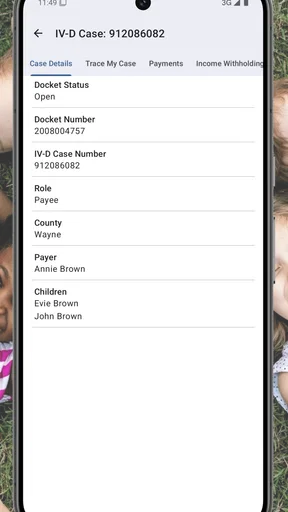
Yes, eligible users may be able to review important details connected with their child support case, such as payment activity, balances, due amounts, case updates, or notices. The exact information shown can vary according to your role, account permissions, and the status of your case. After signing in, check each section carefully and contact the appropriate Michigan support office if information appears incomplete or outdated.
How do I create an account or sign in to MiChildSupport?
To use the app, you generally need to register with personal and case-related information or sign in using credentials already created through Michigan’s child support services. Make sure the details you enter match official records, and use a valid email address or phone number if verification is required. If you forget your password or cannot verify your identity, use the recovery options rather than creating duplicate accounts.
Is MiChildSupport safe to use for personal and payment information?
Because child support records contain sensitive personal, financial, and family information, users should access MiChildSupport only through the official app listing or Michigan government website. Use a strong, unique password, avoid signing in on public or shared devices, and install updates when they become available. The app should not be treated as a replacement for official instructions, court documents, or confidential communication with a caseworker.
Can I make child support payments or request changes through the app?
MiChildSupport may offer payment-related tools, account information, or links to official services, but the options available can depend on your case and Michigan’s current procedures. Not every request can necessarily be completed entirely inside the app. For payment arrangements, enforcement questions, address changes, custody updates, or modifications, read the provided instructions and contact the official child support agency when formal action or documentation is required.


